Up to 93%
of the host-set trip price goes to the host

Why Carvia
Carvia was built around the work other marketplaces leave hosts to piece together—and the uncertainty guests are expected to tolerate. The result is a fuller operating system for hosts and a clearer trip for both sides.
Up to 93%
of the host-set trip price goes to the host
Fleet + per-car
performance, conversion, utilization, and profit views
Live calendar sync
a private feed for Apple and Google Calendar
100% + $50
for an eligible host who fulfills a Trip Rescue
A host operating system
A listing page is not enough. Hosts need one place to plan, communicate, operate trips, understand performance, and handle the exceptions.
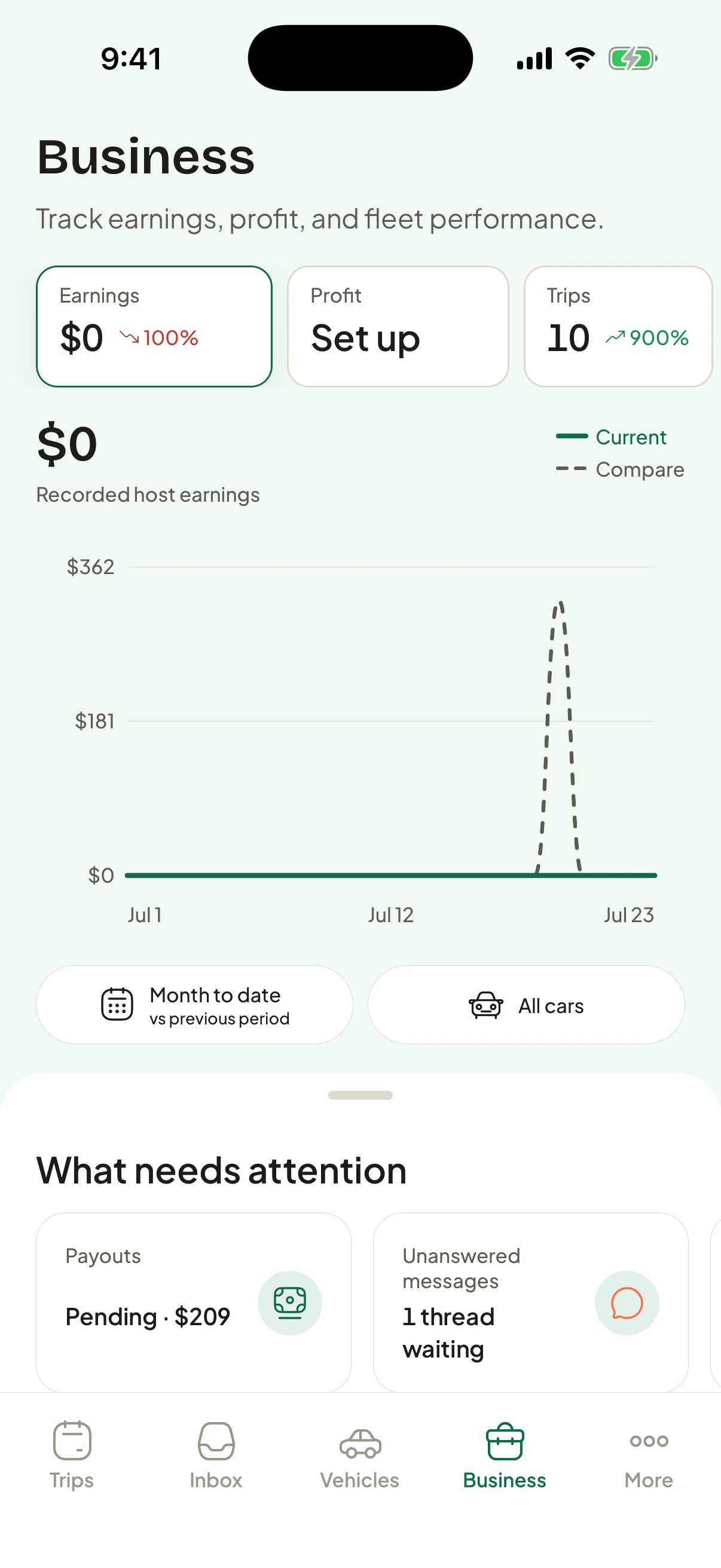
Plan
Manage trips, blocked dates, date-specific prices, pickup hours, and delivery by car. A private, revocable calendar link puts booked trips into Apple or Google Calendar and updates when plans change.
Communicate
Every booking has its own conversation. Schedule a message, insert a reusable template with live trip details, share an attachment, or start an in-app voice call that connects only after both people agree to recording.
Measure
Filter the business dashboard by date and any combination of vehicles. Compare periods, scrub the chart, and move from fleet performance into the statistics for one car.
Control
Choose the price floor, ceiling, and minimum take-home for each car. Automatic pricing is optional, manually priced dates stay pinned, and the host—not the marketplace—decides whether a guest can book instantly.
The full host toolkit
The tools work together because the calendar, conversation, vehicle, trip record, earnings, and claim all point back to the same underlying data.
Daily and date-specific pricing, host-set guardrails, minimum take-home, discounts, mileage, extras, and 75%, 85%, or 93% host-share plans chosen separately for every vehicle.
See the whole fleet or one car, adjust selected dates in bulk, block availability, set pickup and return hours, and manage multiple delivery locations and ranges.
Keep each conversation attached to its trip, schedule messages for later, create templates with guest and vehicle placeholders, share photos, and recover missed-call history.
Track fleet and vehicle performance across comparable periods, then add private operating costs to see profit—not just top-line earnings.
Create hosting teams, assign vehicles, and give co-hosts only the permissions they need for calendars, messages, or trip handoffs. Keep payouts and account ownership with the primary host.
Run guided check-in and return records with photos, odometer, fuel or charge, and location. Linked Tesla vehicles can fill readings automatically, while inspections and recall monitoring stay attached to the car.
Transparent host-share choices
Keep 75%, 85%, or 93%—with the commission and damage responsibility shown beside the share.
When the trip gets complicated
Carvia is designed to do more than open a support ticket after something goes wrong.
Trip Rescue
For an eligible late host cancellation, nearby opted-in hosts can raise their hand to fulfill the trip at the guest’s protected price. There is no price bidding. The replacement host receives 100% of the original trip earnings plus a $50 bonus.
Hosts opt in by vehicle and can set quiet hours. The guest can choose from eligible replacements, while the original host-cancellation refund remains protected.
Shared evidence
Guest and host check-in and return records capture the exterior, interior, odometer, and fuel or charge level. Photos stay timestamped, geotagged, and connected to the trip.
If reported damage is already visible in the guest’s own pickup photos, a claim against that guest is automatically rejected.
Claims that show their work
The claim workspace shows the evidence checklist, status history, decision criteria, and written rationale. Published clocks cover acknowledgment, determination, resolution, appeal, and payment.
Appeals go to a different specialist, and a good-faith filing does not create a fee simply because the claim is denied.
For guests
The car should be the memorable part of the trip—not the checkout total, the cancellation policy, or a damage dispute.
The quote itemizes the trip subtotal, Trip fee, protection, extras, taxes, and total before payment. The Trip fee is typically 8–12%, never more than 20% of the trip or $400, and locks with the quote for 24 hours.
How trip pricing worksFlexible, Standard, and Saver put the price and cancellation terms next to each other at checkout. Before cancellation, Carvia shows the exact refund, charge, reason, and amount paid to the host.
Review cancellation choicesA host-caused cancellation always receives a full refund. Eligible late cancellations can also enter Trip Rescue so nearby hosts can offer a comparable replacement without raising the guest’s protected trip price.
Read the host-cancellation policyCarvia does not require a cash security deposit or a separate deposit authorization hold at booking or pickup. The selected trip terms and claims process govern damage responsibility.
Read the deposit policyNeed a car?
Browse current vehicle photos, features, rules, pickup choices, and a date-specific quote before moving into checkout.
Browse carsHave a car?
Invited Los Angeles hosts can set up their vehicles, pricing, calendars, communication tools, and business workspace while listings remain private.
Join with an invite codeCarvia is in prelaunch. Listings cannot publish or accept trips until launch requirements are met. Some features require an eligible trip, host opt-in, or a supported connected service. Carvia does not yet have a signed insurance-carrier agreement, and carrier-backed third-party liability coverage is not active. Review the current insurance disclosure.